using CODERU
IntrodutionCODERU is available from the maven cetral repository. There are two ways to intergrate CODERU check tool in your build process:
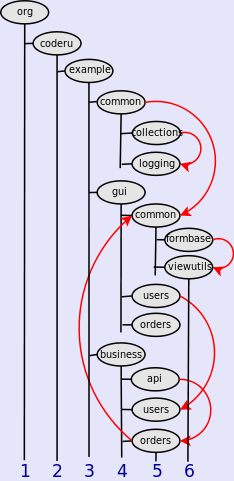
ExampleThe different configuration options will be explained on the example project:
We suppose there are following rule violations shown as the red arcs:
It is important to notice, that the dependencies between the classes under "org.coderu.example" package are checked only. The dependencies to- and within- foreign libraries are not considered. As maven pluginThe simplest way to check your code is conform to CODERU is to extend the plugins section of the pom with the coderu-maven-plugin. Basic configurationIn the basic configuration you have just to define one execution with the goal test:
<plugin>
  <groupId>org.coderu</groupId>
  <artifactId>coderu-maven-plugin</artifactId>
  <version>1.1.0</version>
  <executions>
    <execution>
      <id>coderu</id>
      <goals>
        <goal>test</goal>
      </goals>
    </execution>
  </executions>
</plugin>
Configured this way the whole code of the project will be covered with the check. The check would expose all violations:
Partial check: Bottom-Up strategyAlthough that this maybe a right way for a new project to force all the code is conforme to CODERU rules, it will not be possible in the project has not being developed with CODERU in focus from the beginning. Instead to cover the whole project it is possible to define particular subtrees to check. In the following configuration only packages org.coderu.example.common and org.coderu.example.gui.common (and they succeeders) will be considered by the check:
<plugin>
  <groupId>org.coderu</groupId>
  <artifactId>coderu-maven-plugin</artifactId>
  <version>1.1.0</version>
  <executions>
    <execution>
      <id>coderu</id>
      <configuration>
        <rootPackages>
          <param>org.coderu.example.common</param>
          <param>org.coderu.example.gui.common</param>
        </rootPackages>
      </configuration>
      <goals>
        <goal>test</goal>
      </goals>
    </execution>
  </executions>
</plugin>
The check will consider defined packages only and yield:
Partial check: Top-Down strategyWith depth tag the "top-down" refactoring strategy is supported. The depth tag defines the depth in the package hierarchy up to which the check will be done.
<plugin>
  <groupId>org.coderu</groupId>
  <artifactId>coderu-maven-plugin</artifactId>
  <version>1.1.0</version>
  <executions>
    <execution>
      <id>coderu</id>
      <configuration>
        <depth>4</depth>
      </configuration>
      <goals>
        <goal>test</goal>
      </goals>
    </execution>
  </executions>
</plugin>
With the depth "4" only violations between common, gui and business will be checked.
Exclude packages from checkAdditional to the both strategies above packages can be excluded from check by defining excludedPackages tag. In the following configuration packages org.coderu.example.common.loggig and org.coderu.example.gui.common (and they succeeders) will not be considered by the check:
<plugin>
  <groupId>org.coderu</groupId>
  <artifactId>coderu-maven-plugin</artifactId>
  <version>1.1.0</version>
  <executions>
    <execution>
      <id>coderu</id>
      <configuration>
        <excludedPackages>
          <param>org.coderu.example.common.loggig</param>
          <param>org.coderu.example.gui.common</param>
        </excludedPackages>
      </configuration>
      <goals>
        <goal>test</goal>
      </goals>
    </execution>
  </executions>
</plugin>
The result now:
Prohibit a class to reference one another in the same packageWith the tag classesDependencyInPackageAllowed you can prohibit dependecies between classes within the same package.
<plugin>
  <groupId>org.coderu</groupId>
  <artifactId>coderu-maven-plugin</artifactId>
  <version>1.1.0</version>
  <executions>
    <execution>
      <id>coderu</id>
      <configuration>
        <classesDependencyInPackageAllowed>false</classesDependencyInPackageAllowed>
      </configuration>
      <goals>
        <goal>test</goal>
      </goals>
    </execution>
  </executions>
</plugin>
Default value for the tag classesDependencyInPackageAllowed is true.
By setting classesDependencyInPackageAllowed to false you enforce all dependencies between
classes being mirrored in package hierarchy. It ensures the absence of the cycles on the package level and it prevents bad design that could otherwise arise because of putting too much functionality on one place without appropriate structuring. Use sysonymsWith the tags public,private,common and factory you can rename predefined CODERU package names (api, impl, common and factory accordingly).
<plugin>
  <groupId>org.coderu</groupId>
  <artifactId>coderu-maven-plugin</artifactId>
  <version>1.1.0</version>
  <executions>
    <execution>
      <id>coderu</id>
      <configuration>
        <public>public_</public>
        <private>private_</private>
        <common>shared</common>
        <factory>builder</factory>
      </configuration>
      <goals>
        <goal>test</goal>
      </goals>
    </execution>
  </executions>
</plugin>
|
|